Apple has hired Advanis to conduct surveys of Apple customers. This seems something of a non-Apple move (Steve Jobs was famous for not asking the customer what they wanted), but does appear to be legitimate. I received one today regarding an iPod that I purchased a couple months back. (As an aside, iPods are definitely not hot right now but I figured I should go ahead and buy an iPod Classic while they’re still around so that I can have my entire music collection in my car. 160GB is a lot bigger than any of the flash options and I could see it being discontinued at any time.)
Interestingly enough I didn’t buy the iPod from Apple directly, I got it through Amazon. Apple must have picked up my details when I synced it with iTunes. It came from MarketResearch@InsideApple.Apple.com and was sent through an Apple server (which is why it is legitimate). Advanis is a Canadian market research firm and other than the URL the survey itself is completely branded by Apple.
Here’s what the email looks like:
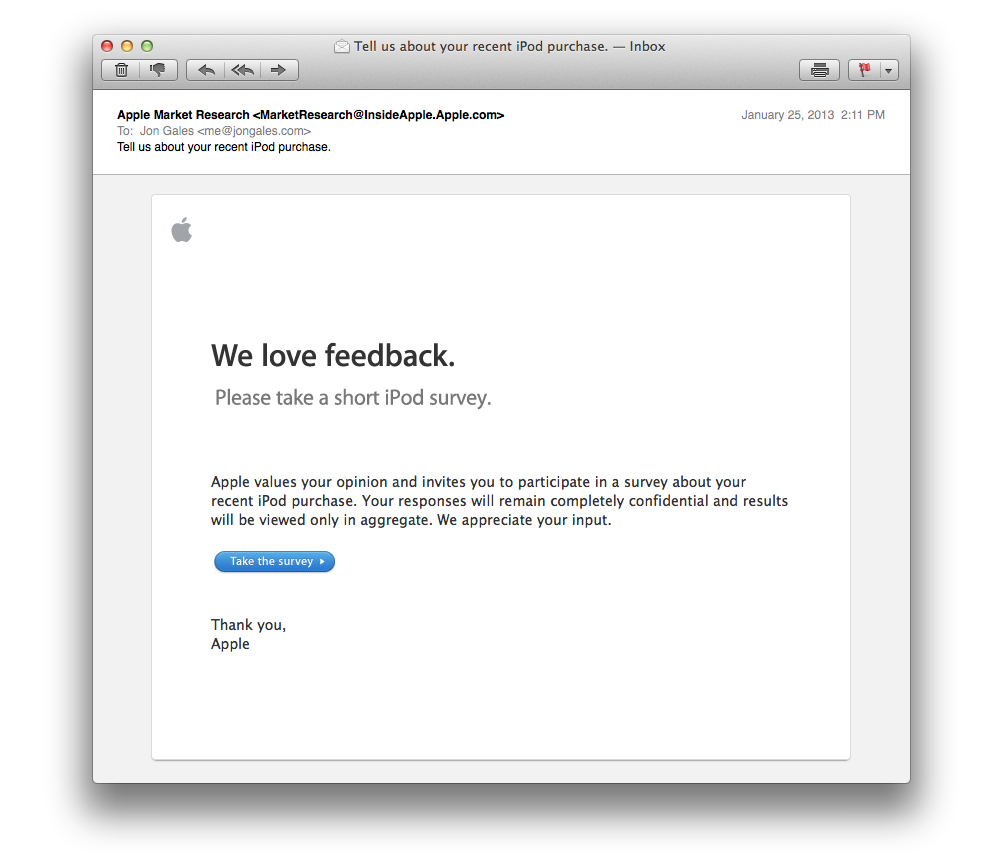
For what it’s worth, I did not take the short iPod survey. If Apple’s reading: I bought it because it’s got a ton of storage and I have a feeling you won’t buy able to buy iPods with this much storage for very long.
If you’re a web publisher considering using CPX Interactive to fill advertising inventory I recommend that you do not. CPX has failed to pay me on their own terms and has stopped responding to communication.
CPX was originally quite motivated to get things going, their account reps John Rosa and James Weigel responded nearly immediately as we discussed the deal. The insertion order was sent over quickly and I returned it ASAP. Advertising started and that’s when I stopped hearing anything. We had agreed upon a CPM payment structure, but unmentioned in our discussion was a limitation to US traffic. To be fair they did include this on the IO, but it wasn’t spoken of and it turns out CPX arbitrarily decided to pay 15% of our agreed upon CPM for traffic outside of the US. The account reps that were so eager to get started never mentioned anything about the non-US traffic and the reporting tool they provided has no way to see this traffic that is not providing a return.
At the end of the day a few less bucks isn’t the end of the world, but it was a valuable lesson. However, that’s not why I wouldn’t recommend working with CPX (though it would make me think twice). The real reason I don’t recommend CPX is that I haven’t seen a dime yet despite starting to run their ads three months ago!
CPX wanted to pay on a net-45 basis which is a bit long for my taste but was not too extraordinary (everyone likes to be paid quickly and not have to pay their bills quickly). I agreed to the net-45 terms, but CPX has failed to meet their own payment terms. At the time of this writing CPX has missed their own 45 day mark by a cool 28 days. I pointed this out and since then CPX won’t respond to my emails or answer my calls. Thanks to their long net-45 terms I had run their ads for another month and a half before I knew there would be a problem receiving payment (and before I found out my payments were going to be for much less than I had anticipated because of the international traffic). The real kicker is the ads all seemed to be for digital products sold through ClickBank which is on a two week payment schedule. Net-14 must be nice.
There are more reputable firms to work with, I don’t recommend working with CPX Interactive.
Update: Like magic, the day after this post I received a payment. Supposedly covering August and September, but the payment was sent without a breakdown of how the figures arrived at and they were [significantly] different than both the CPX reporting tool and the original higher figures based straight off CPM. The kicker was getting an email from someone in accounting about how I should have received a payment for $X where $X was yet another figure. So to re-cap: I have a total of what I was expecting from a straight CPM basis, what CPX’s own reporting tool says, what the payment was for and what accounting said the payment was for. This is not encouraging. Supposedly my account rep is “looking into it” and I’ll hear back at a later date. I stand by my earlier statement–there are much more reputable firms to work with than CPX. You can’t wing it, especially when it comes down to money.
Update 2: The small discrepancy above ended up being a timezone issue, despite my using the default timezone and the account rep’s emailed figures matching what I saw in my timezone. Incredibly sloppy on CPX’s behalf.
Update 3: It’s now December 17th and yet again CPX Interactive has missed its payment window (a generous 45 days). I’m still waiting to be paid for October. This is starting to feel like not paying publishers on time is a routine business operation over at CPX Interactive. It will be interesting to see what the payment total is for this time…
Update 4: After following up with all my contacts at CPX, I got paid on December 20th, which would be Net-50. As usual, the amount paid was slightly different than what their reporting system says, but it was just a few pennies which makes it nothing more than a curiosity.
I had a strange problem pop up recently in Mac OS X Mountain Lion where operations to reveal a file in the Finder would not work. I noticed it first in Chrome where I would try and open a downloaded file and could not get to it. Then I tried to reveal a download in Safari and got the same thing (confirming it was not a bug in Chrome). The same issue then appeared in Sublime Text 2, I could not jump to the Finder with my file selected. Same with Adobe Lightroom. iTunes still works, but that’s the only example I found that was not broken. Pretty much everywhere you can “Reveal in Finder” or “Open in Finder” is broken. The craziest part of this thing is it happened both on my laptop and desktop.
It appears I am not alone, which means it’s likely on Apple’s side and is not due to some combination of apps that I use. There is not a permanent fix [yet!], but you can get a temporary reprieve by killing the appleeventsd process:
$ sudo killall -KILL appleeventsd
The underlying bug seems to be unrelated to the action of actually revealing a file in the Finder, but that’s a common operation that demonstrates the issue. According to this report, the problem is applications getting into a state where they cannot send Apple events when the events are addressed by the bunder identifier.
After years of considering it, I finally scooped up my first eInk display powered Kindle. The Amazon Kindle PaperWhite is the latest generation of Kindle and combines the touch screen technology first seen in the Kindle Touch (though it has been improved) with a novel backlight system to facilitate reading in the dark. The light is what suckered me in, I had stayed away from eInk because I frequently read in bed and having to use a book light seemed absurd (not to mention distracting for anyone else). Now with the PaperWhite I can read in full sunlight and in the dark, all without any accessories.
The size is great, if you haven’t used a 7″ tablet before it’s the perfect size for reading. That’s why Apple shrunk the iPad (or slightly enlarging the iPhone I guess, since it came first) to be the same size. You can hold it with one hand and it’s perfect for reading while laying down. After using the Kindle for a bit the [full sized] iPad feels gigantic.
I live in Florida and it’s wonderful to have a device with a screen that looks perfect in direct sunlight. I can’t wait until they figure out how to do the same with non-eInk displays so that phones and regular tablets will be usable outside (or even with polarized sunglasses).
The touch screen on the PaperWhite responds faster than the Kindle Touch and the redraw rate also seems improved. The on screen keyboard is surprisingly usable, though I have only needed to use it a few times for WiFi passwords and a couple searches. I opted for the 3G model so that my reading progress would sync to Whispernet without connecting to WiFi which is often the case if I’m traveling.
The only thing I would change is to put a button on the back to turn the page. It’s slightly annoying to have to touch the front, though usually a thumb can reach and not be too much of a hassle.
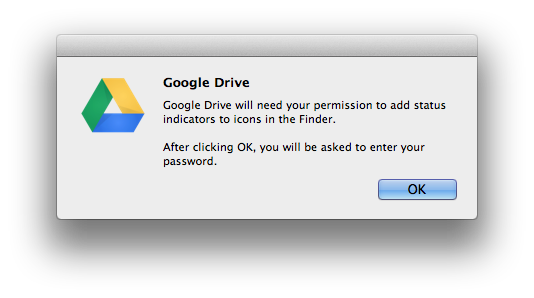
I had Google Drive pop up an interesting dialog today asking for my permission to add status indicators to icons in the Finder. I think this is a play to make Drive more like Dropbox, which uses icons to show the status of files in the Finder. I gave my permission and then checked my Google Drive folder to see if anything changed and after a few minutes it looks like I was exactly right. For reference, I’m currently using version 1.5.3654.0684.
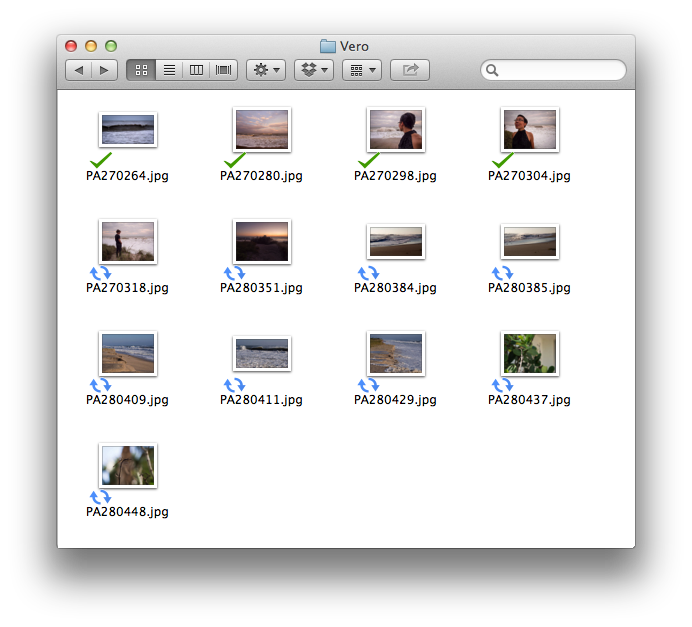
They still seem a little buggy because I noticed after dragging that folder of photos into my Google Drive that they all initially had a green “synced” check icon and then all switched to the blue refresh icon and finally each updated back to a check as they were synced. They also don’t appear to update in the background, I had the window out of focus and thought progress was stalled, but clicking on the window updated all the icons to show sync was complete.
I got an iPhone 5 right after getting a Hyundai Genesis and to my dismay the new phone and new car did not work together. I assume other car manufacturers are in the same boat because Apple did not provide any heads up on the new Lightning connector. The Genesis has an auxiliary input as well as a USB input and Hyundai actually included a 30-pin connector cable that oddly fits into both ports. This worked great with any previous iOS device, you get a digital signal right into the head unit and can control playback through the steering wheel and everything else you would expect.
The iPhone 5 does away with the venerable 30-pin connector in favor of the smaller Lightning connector. A Lightning to USB cable is provided in the box for charging and plugging that into my Hyundai Genesis sent the phone into a repeating loop of trying to connect but never making it. Frustrating to say the least, but at least Bluetooth still worked fine so I had music (but no control, over Bluetooth you have to change the songs on the phone and not from the car which is not safe).
I ordered the iPhone 5 along with the $29 Lightning to 30-pin Adapter at the same time, but Apple apparently put more focus on the phone and didn’t start shipping the adapters until last week. It’s now at a 2-3 week shipping time which I assume means they’re selling like hot cakes (no surprise since at this time there are exactly 0 accessories that are compatible with the Lightning connector…) I have finally received the adapter and am happy to report that there appears to be full functionality with my car–the phone shows it has power and playback is controlled through the vehicle. Success. Your mileage may very, all iPod integrations are not the same and it may only be a certain variety that are compatible. All I know is that whatever is in the 2012 Hyundai Genesis is indeed compatible with the new Lightning to 30-pin Adapter Oddly enough, apparently even Hyundai had no idea if it would work or not and were similarly waiting to get their hands on an adapter to find out. Apple really could have made this transition a lot smoother.
Spoiler: the Lightning to 30-pin Adapter is compatibile with the Hyundai Genesis (and likely other models)
Despite the phone now working with my car, I still think I’m just going to go with an iPod Classic and keep it in the center console. 160GB fits my whole music collection and I don’t have to bother with plugging or unplugging anything when using the vehicle. It’s also nice that with the direct connection music starts where I left off and as soon as I start the car (with Bluetooth it defaults back to the radio and if I have to plug in my phone there’s obviously a delay there too).
Have you noticed a large amount of direct traffic from Inktomi Corporation in your Google Analytics reports? In my case the traffic was all coming from Bethesda, Maryland though I have read reports with the same issue form different cities. The visits are all direct and are one page per visit (or very close to it). The browser is “Mozilla Compatible Agent” and it is version 5.0. I have thousands of these visits (see screenshot below).
What is this? Well it appears this is the Yahoo! bot executing the Google Analytics Javascript and Google is not filtering it out correctly. Inktomi was a search engine data provider back in the day, but Yahoo! scooped them up back during the 2000 dot com bubble.
Read more
After installing Mac OS X Mountain Lion you may find that your Python virtualenv setup has broken. I saw a traceback ending in “IOError: [Errno 2] No such file or directory: ‘/System/Library/Frameworks/Python.framework/Versions/2.7/lib/python2.7/distutils/__init__.py'”
Another error was being produced by virtualenvwrapper when trying to use the workon command: “ImportError: No module named virtualenvwrapper.hook_loader”
Fixing my virtualenv setup was pretty simple:
- Installed the XCode 4.4 Command Line Tools.
- Re-installed pip: sudo easy_install pip
- Re-installed virtualenv and virtualenvwrapper: sudo pip install virtualenv virtualenvwrapper
No other changes were needed and everything was running smoothly.
I keep looking up the resources sizes for iOS web apps (for when users save to their home screen). This is complicated by the sizes changing from time to time, so there is a lot of misinformation. Here is what’s current and what works:
|
Home screen icon |
Startup image |
| iPhone 3Gs / iPod Touch |
57 x 57 |
320 x 480 |
| iPhone 4/4s / iPod Touch |
114 x 114 |
640 x 960 |
| iPad / iPad 2 |
72 x 72 |
768 x 1004 (portrait) 1024 x 748 (landscape) |
| New iPad |
144 x 144 |
1536 x 2008 (portrait) 2048 x 1496 (landscape) |
Read more
I live in downtown Tampa and the 2012 Republican National Convention is taking place here this August. The city has seen a lot of public works project in advance, mostly beautification , but also some infrastructure. Good infrastructure like improved cell networks (LTE here is fast), but also bad infrastructure like a mesh network of spy cameras (or CCTV if you’re working for the man). I have seen the installation happen and it started by mounting antennas all over the downtown area. Seeing workers isn’t unusual here, but each of these installations was conspicuous because of a Tampa Police Department car parked by the cherry picker. Very strange to need a cop to watch someone mount an antenna, let alone dozens of antennas.
It’s a Saturday today and I was out for a walk and saw the familiar seen of someone in a cherry picker and a TPD cruiser looking over. This particular corner had an antenna installed weeks before (and I had taken pictures then too, curious about the specifics of the antennas), so I figured the camera portion was getting added today. I watched for about 15 seconds and noticed that the worker at the top was looking back at me. Strange, but there’s not much to distract yourself with up there so I didn’t think much of it. Then I took out my phone and snapped a picture. This set the worker off, he started yelling at me and then yelling “he took a picture, go get him!” to the cop. It’s a hot day and the deputy was inside his car, so I assume it took a bit for him to respond because I continued walking and was not interrupted. During my walk I made sure to upload the photo just in case I got in contact with an officer who had a less than perfect legal mind.
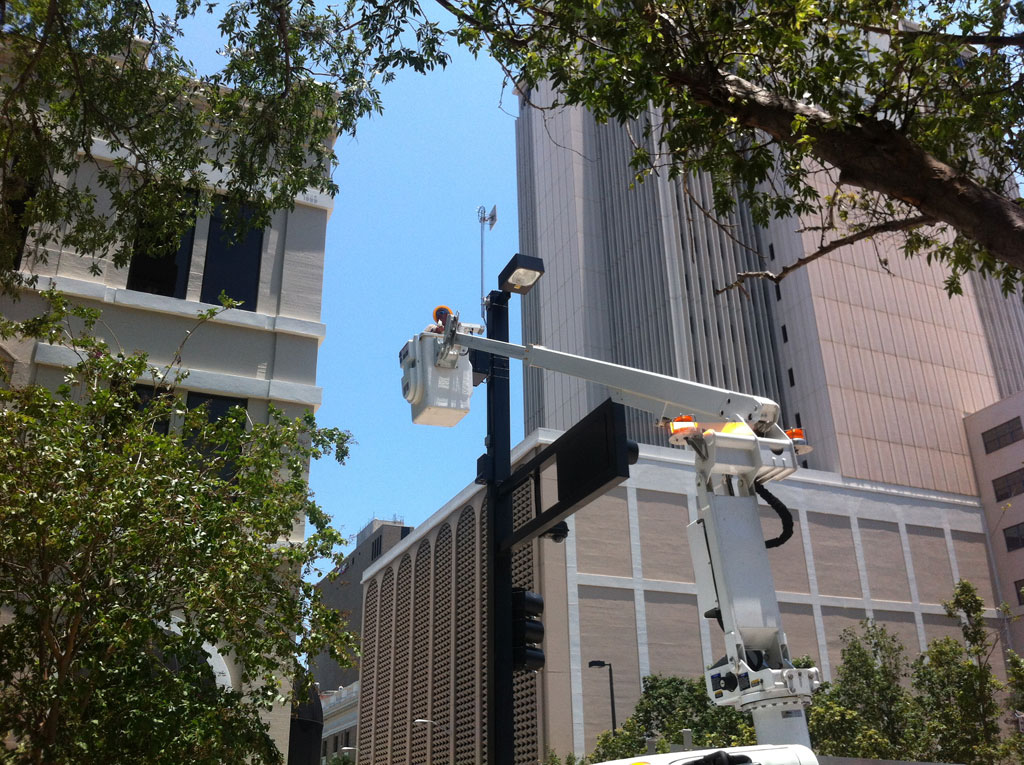
I grabbed a drink and then on my walk back decided to get another look, this time from across a fenced and barricaded street from another unrelated beautification project. He caught on quickly and yelled again, saying that I was a “piece of trash” and then yelling to the cop who was now out and about. The worker’s perch let him give updates to the cop, but again I was able to walk away without being interrupted.
I want to know what’s going on. We all know there will be spy cameras in downtown Tampa because of the RNC. We all have eyes and can see where they are. The antennas are large and noticeable, even an untrained eye can spot them. This was a public street and there was no way to know that photography was prohibited, even though the law there is dubious at best (I was in public, surrounded by people and taking a picture of a light pole which will remain fully visible for years).
When citizens complain about spy cameras, the response is frequently if you’re not doing anything to hide, you have nothing to fear. Or that they will just be used to solve crimes. It’s not very encouraging that they are already suppressing freedoms during the installation of these private eyes in the sky. The city has given millions of dollars to Aware Digital for apparent goons to install cameras that invade all of our privacy. Even St Petersburg has paid hundreds of thousands of dollars for CCTV during the RNC even though they aren’t hosting it. Governments use things like this as an excuse to get the toys they could never justify previously. The RNC is in and out in a week, we’re stuck with big brother for ever.
When they began installing the equipment, I took these photos. I didn’t know they would come in handy later.
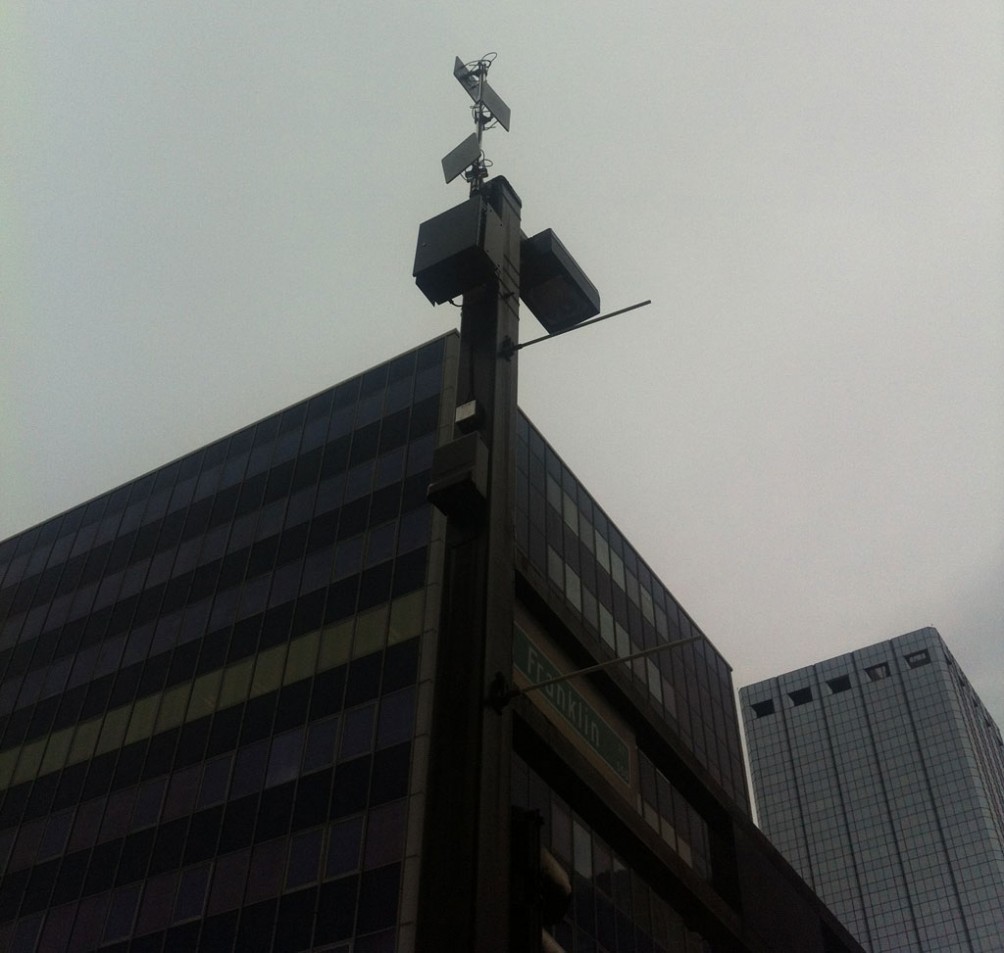
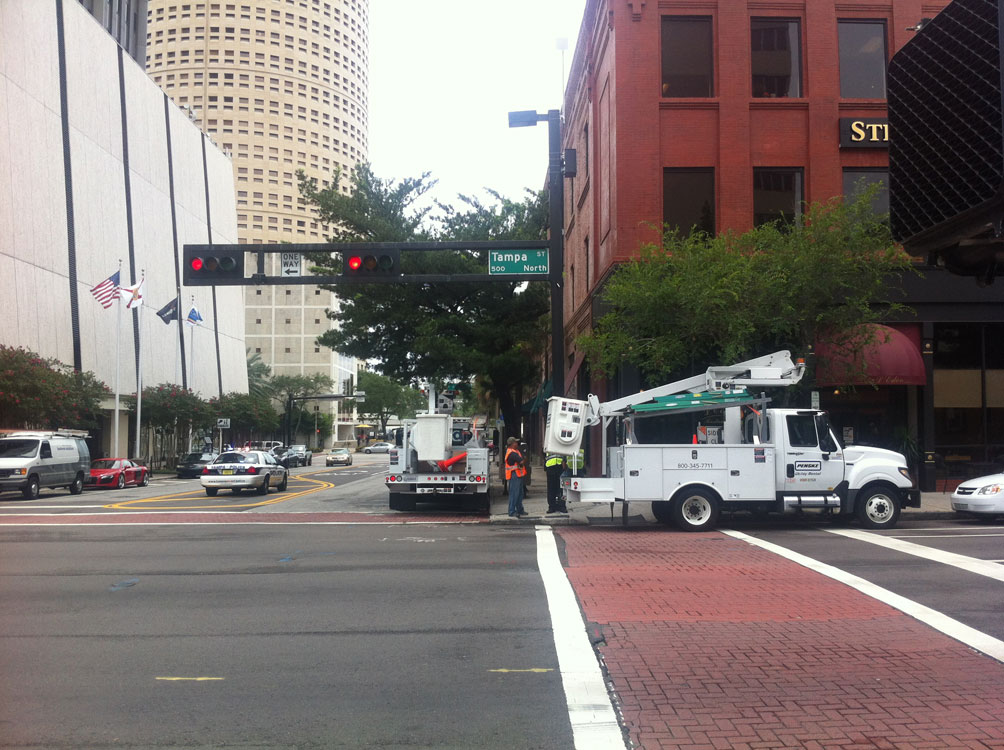
Finally, since they apparently have something to hide, here’s a little bit about what cameras are being installe. The main contract is to Aware Digital, a creepy sounding Miami based company with nearly no web presence (coming soon, @2006) and Orwellian employment practices. They’re wireless and run on a custom built wireless mesh network. Officers can access the live video from mobile devices, ensuring future citizens will have to walk faster than I did. The contract is for about 60 cameras, which should cover a large amount of downtown. Their contract stated it needed to be up by July 1, which would explain why they were working today (June 30). Exact specifications of the cameras are hard to pin down, with people saying different things. City council types love to think they have classified intelligence and both boast and understate. Aware Digital spoke a little more about the system they had for Superbowl XLIV in Miami. That was two and a half years ago, so we’re likely a lot more sophisticated but they had HD pan/tilt/zoom cameras with 10x optical zoom. Not too shabby.
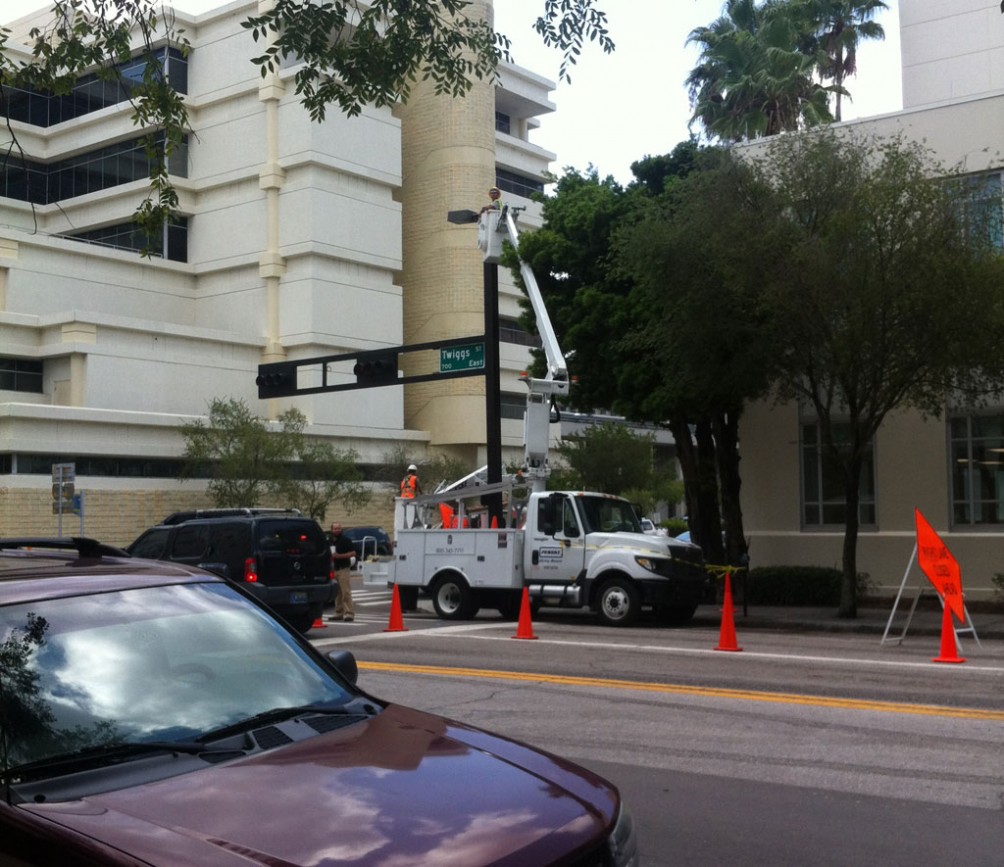
Update: It’s Monday and I was walking by the county courthouse and saw the familiar scene of a squad car and cherry picker. Low and behold it was the same Aware Digital goon. Unbelievably, out of the mass of people at lunch time around the busy courthouse he spotted me before I took a photo. I then snapped a picture as he yelled to a cop, “I knew it, there he is!”. What is going on?
Update 2: I have started a Google Map to track the locations of all these CCTV cameras. If you have spotted a camera that isn’t on the map, please get in touch.
Update 3: I got bored and made this data into a mobile friendly web app for use around Downtown during the convention: RNCCTV.